
Introduction
This Rank Math review is written from daily use, not from a demo. I run the free version of Rank Math on two live WordPress sites, kramarketing.com and sewpassion.com, and it is the plugin I open every time I publish a post. It scores my content, checks my focus keyword, handles my sitemaps and schema, and tells me plainly when a title or meta description needs work.
That matters because most Rank Math reviews you will find online are written by people who installed it for an afternoon. I have used it through real publishing cycles: blog posts, service pages, a Black Friday deals roundup, and a 3,600 word SEO guide. I have not used Rank Math PRO myself, so everything about PRO in this review comes from Rank Math’s own documentation and pricing page.
If you run a WordPress site and you want one SEO plugin that covers the basics properly without charging you from day one, Rank Math is the first one I would try.
Affiliate disclosure
Some links in this article are affiliate links. If you buy Rank Math PRO through one of them, I may earn a commission at no extra cost to you. It does not change what I say here. I use the free version myself, and the opinions in this review are my own.
Prefer video? Rank Math’s official overview:
What is Rank Math?
Rank Math is a WordPress SEO plugin. It lives in your WordPress dashboard and handles the search optimization work for your site: titles and meta descriptions, on-page content checks, XML sitemaps, schema markup, redirections, and the connection to Google Search Console.
It launched in 2018 and has grown fast since. Rank Math says it has more than 4 million users and over 7,000 five star reviews on WordPress.org.
The plugin comes in two parts. The core plugin is free, with paid plans (PRO, Business, Agency) that add rank tracking, advanced schema, WooCommerce SEO, and multi-location local SEO. On top of that sits Rank Math AI, a separate subscription covering Content AI, AI Link Genius, and AI Visibility. That split catches people out, and I cover it in the Content AI section below, because the AI tools are not included in the price of PRO.
Who is Rank Math for?
Rank Math fits a few groups well:
- Bloggers and affiliate marketers who publish regularly and want a clear score and checklist for every post before they hit publish.
- Small business owners who run their own WordPress site and need local SEO basics, sitemaps, and schema without hiring an agency.
- Freelancers and agencies who manage client sites and want one license that covers many sites, with white label reports on the higher plans.
- WooCommerce store owners who need product schema and store specific SEO settings (PRO plan and up).
It is probably not the right pick if you want a fully hands-off tool. Rank Math gives you the checks and the settings, but you still have to write the content.
Rank Math Free vs PRO: what you actually get
The free version is unusually generous. Here is the honest split between free and PRO, based on Rank Math’s own feature comparison:
| Feature | Free | PRO |
|---|---|---|
| On-page SEO analysis (score out of 100) | Yes | Yes |
| Focus keywords per post | Up to 5 | Unlimited |
| Setup wizard (Easy and Advanced modes) | Yes | Yes |
| XML sitemaps | Yes | Yes, plus News and Video sitemaps |
| Schema generator (built-in types) | Yes (18 types) | Yes, plus custom schema builder and 840+ types |
| FAQ and custom schema in the post editor | No (PRO-only) | Yes |
| Redirections manager | Yes | Yes, plus advanced rules |
| 404 monitor | Yes | Yes, plus export |
| Role manager | Yes | Yes |
| Google Search Console data in dashboard | Yes (90 days kept) | Yes, longer retention |
| Keyword rank tracker | No | Yes, 500 keywords |
| Content AI | Small free allowance | 15-day trial only (separate subscription after) |
| Google Analytics 4 integration | Basic | Advanced |
| WooCommerce SEO | No | Yes |
| Local SEO (multiple locations) | No | Yes |
| Image SEO (advanced) | No | Yes |
| Instant indexing | Yes | Yes |
| Broken Link Checker / AI Link Genius | No | Yes |
| Email SEO performance reports | No | Yes |
| Support | Community forum | 24/7 support |
The free version covers everything a single site needs to get the SEO basics right. PRO is for people who want rank tracking, advanced schema, store SEO, or the AI tools. Most site owners should start free and only pay when they hit a specific limit.
One limitation worth knowing upfront: in the free version, the FAQ schema and custom schema options in the post editor are greyed out. I work around that on my own sites by adding FAQPage JSON-LD in a Custom HTML block at the end of the post, which works fine and is invisible to readers. It is a small extra step, not a reason to pay.
Rank Math review: key features, tested and explained
Setup wizard
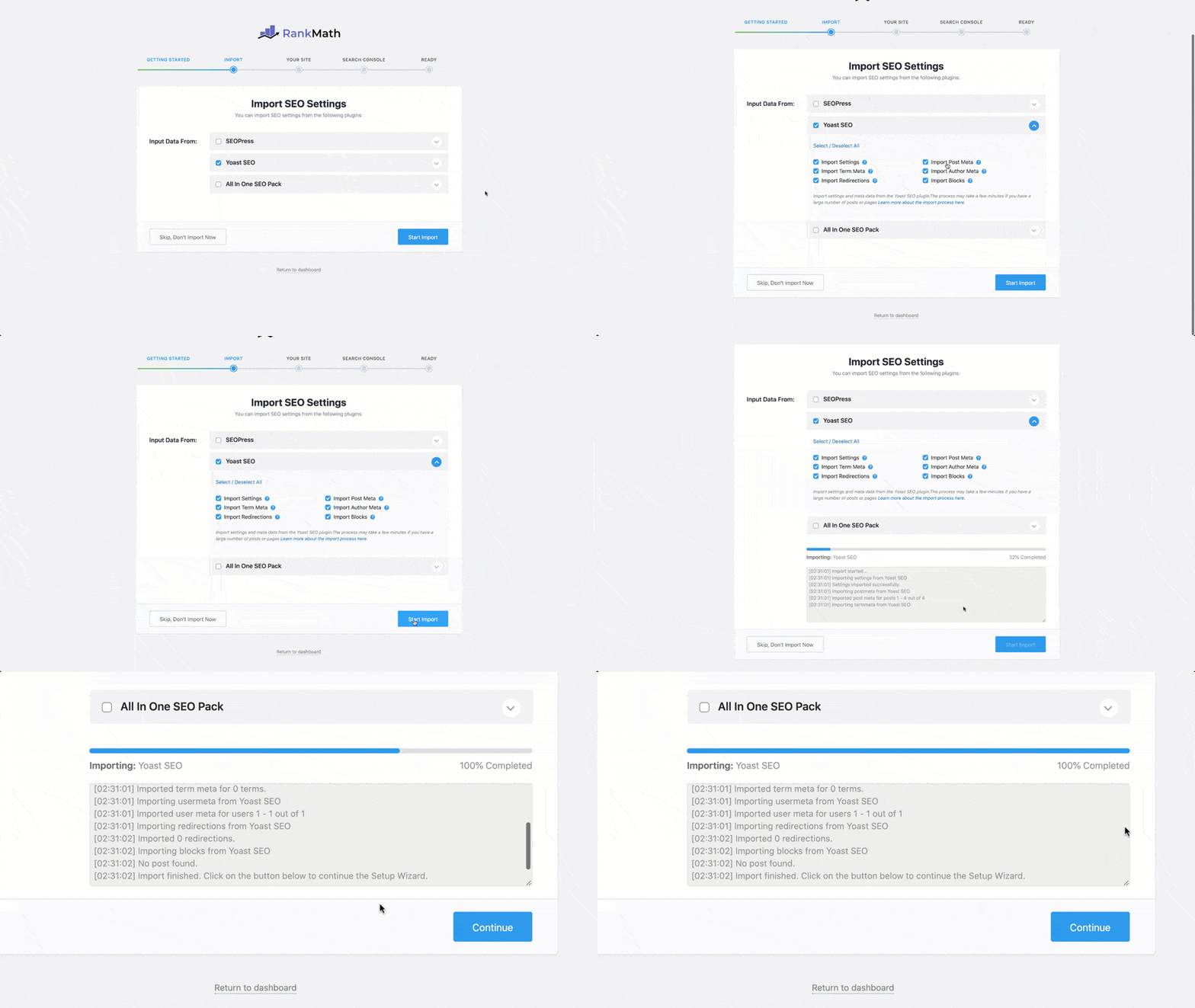
Rank Math starts with a setup wizard, and it is one of the better ones in WordPress. You pick Easy mode or Advanced mode. Easy mode asks a few questions about your site and sets sensible defaults. Advanced mode walks through the same steps with more control: your site type, Search Console connection, sitemap settings, SEO tweaks, the Role Manager (which user roles can change SEO settings), the 404 monitor and redirections, and your default schema type. If you are switching from another SEO plugin, the wizard imports your settings from Yoast, All in One SEO, and others.
Rank Math’s official complete setup tutorial:
On-page SEO analysis
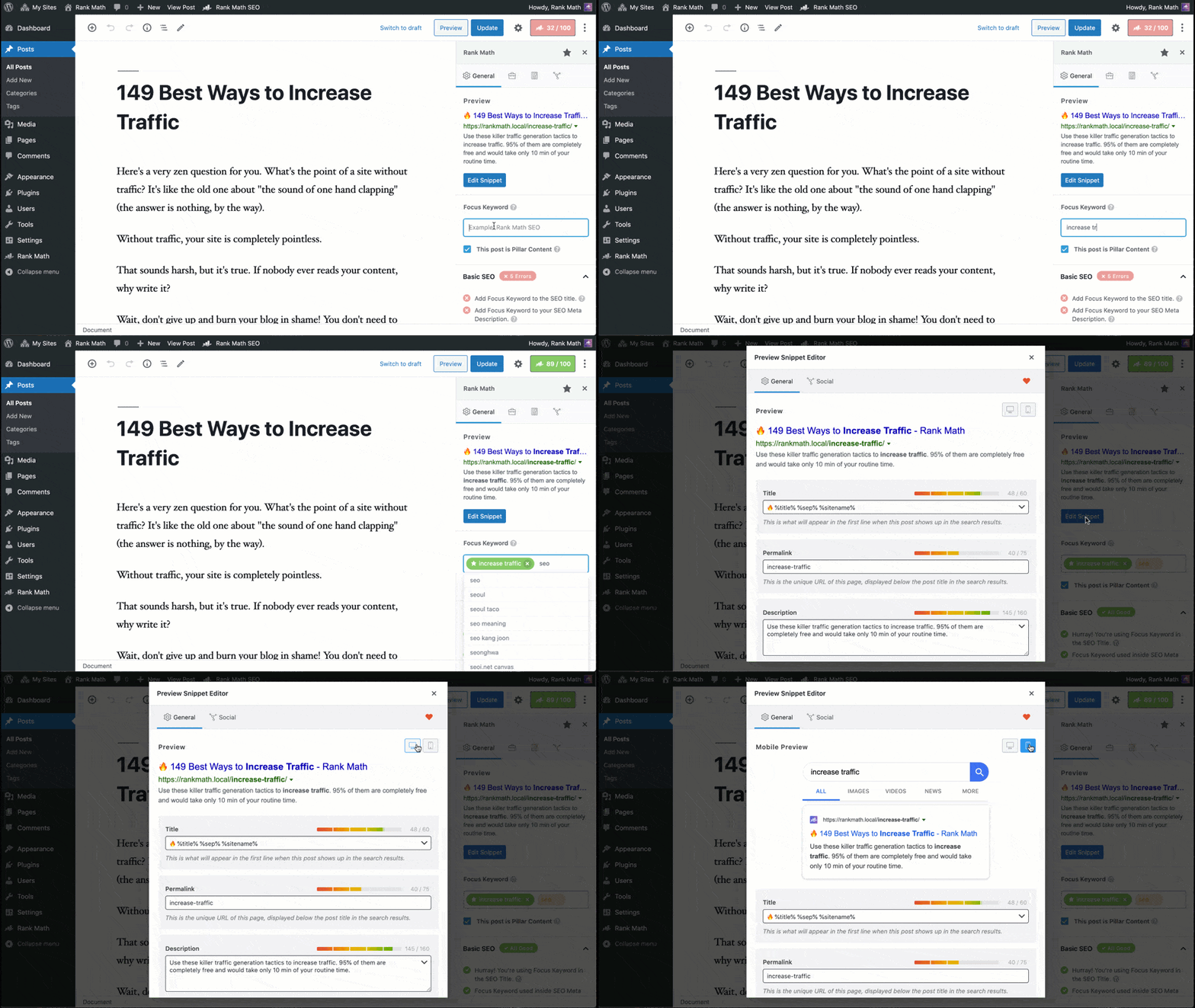
This is the feature I use most. Every post and page gets a content analysis box in the editor. You set a focus keyword, and Rank Math runs more than 30 checks against your content: keyword in the title, in the introduction, in headings, in the URL, in image alt text, content length, and internal and external links. Each check passes or fails, and you get a score out of 100.
The score is a guide, not a grade. I have published posts that scored 68 and posts that scored 85, and the score alone does not decide whether a post ranks. What the analysis is good for is catching the things you forgot: the focus keyword missing from the first paragraph, a meta description that is too long, a post with no internal links. On my own sites, scores typically land between 68 and 85.
One honest note: the score can become a trap. Chasing 100 out of 100 on every post leads to awkward, keyword stuffed writing. Use the checklist to catch mistakes, then trust your judgment on the rest.
Schema and structured data
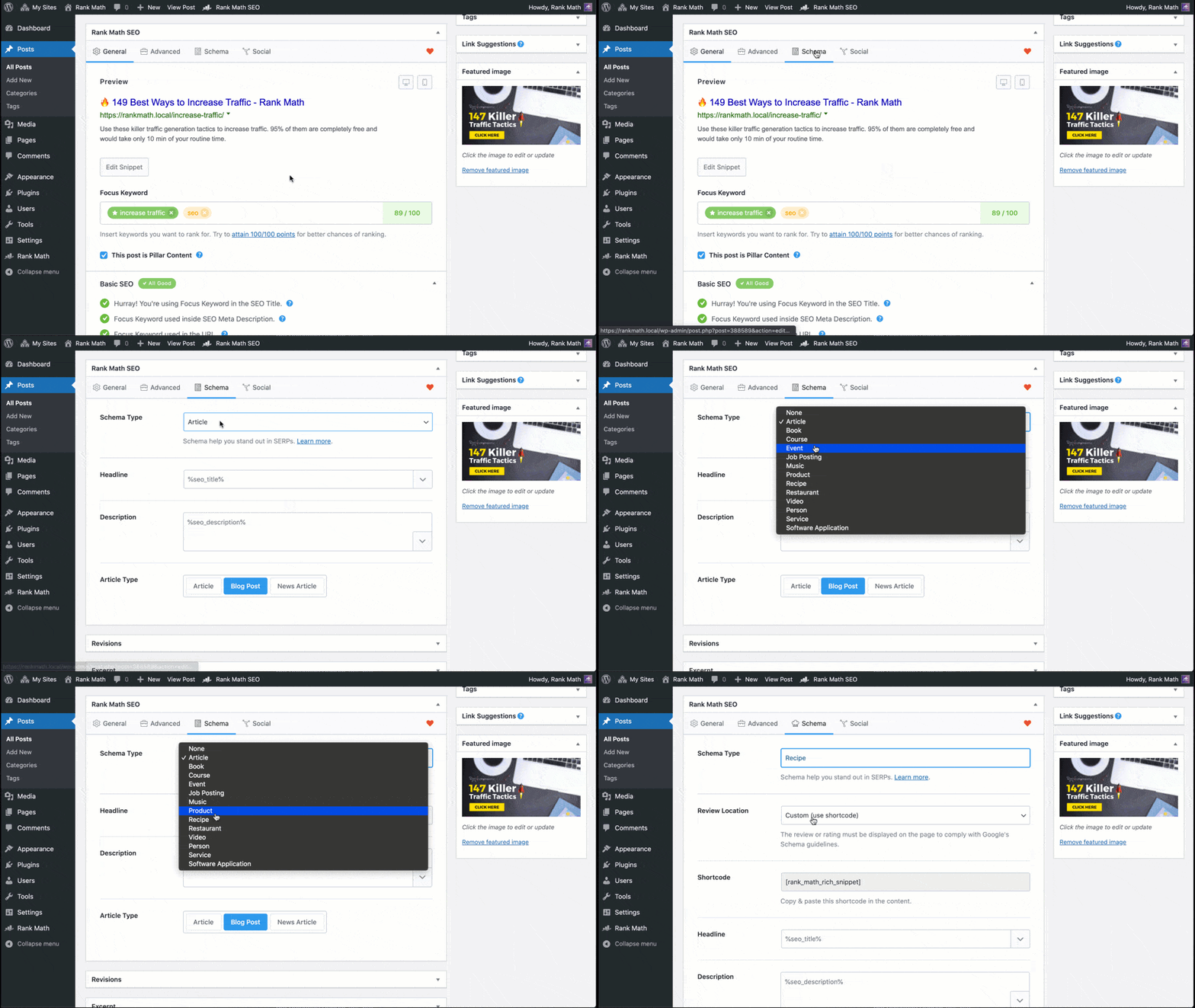
Rank Math has one of the strongest schema tools of any WordPress SEO plugin. The free version includes 18 built-in schema types (Article, Product, Recipe, FAQ, Local Business, and others). PRO adds a custom schema builder, the ability to import schema from any website, validation against Google’s checker, and support for more than 840 schema types.
In practice, the schema I use most is Article schema on blog posts and LocalBusiness schema on the business site. Both work out of the box in the free version. As I mentioned above, FAQ schema in the post editor is PRO-only, so I add it by hand with a JSON-LD block. If you publish a lot of FAQ content and you do not want that extra step, that alone may justify PRO for you.
Redirections and 404 monitor
The free version includes a redirections manager and a 404 monitor. When you rename a post or delete a page, the 404 monitor logs the dead hits, and you can redirect the old URL to the right place in a few clicks. PRO adds advanced redirection rules, regex support, and bulk management.
XML sitemaps
Rank Math generates your XML sitemap automatically and updates it when you publish or edit content. PRO adds dedicated News and Video sitemaps.
Content AI (and the pricing catch)
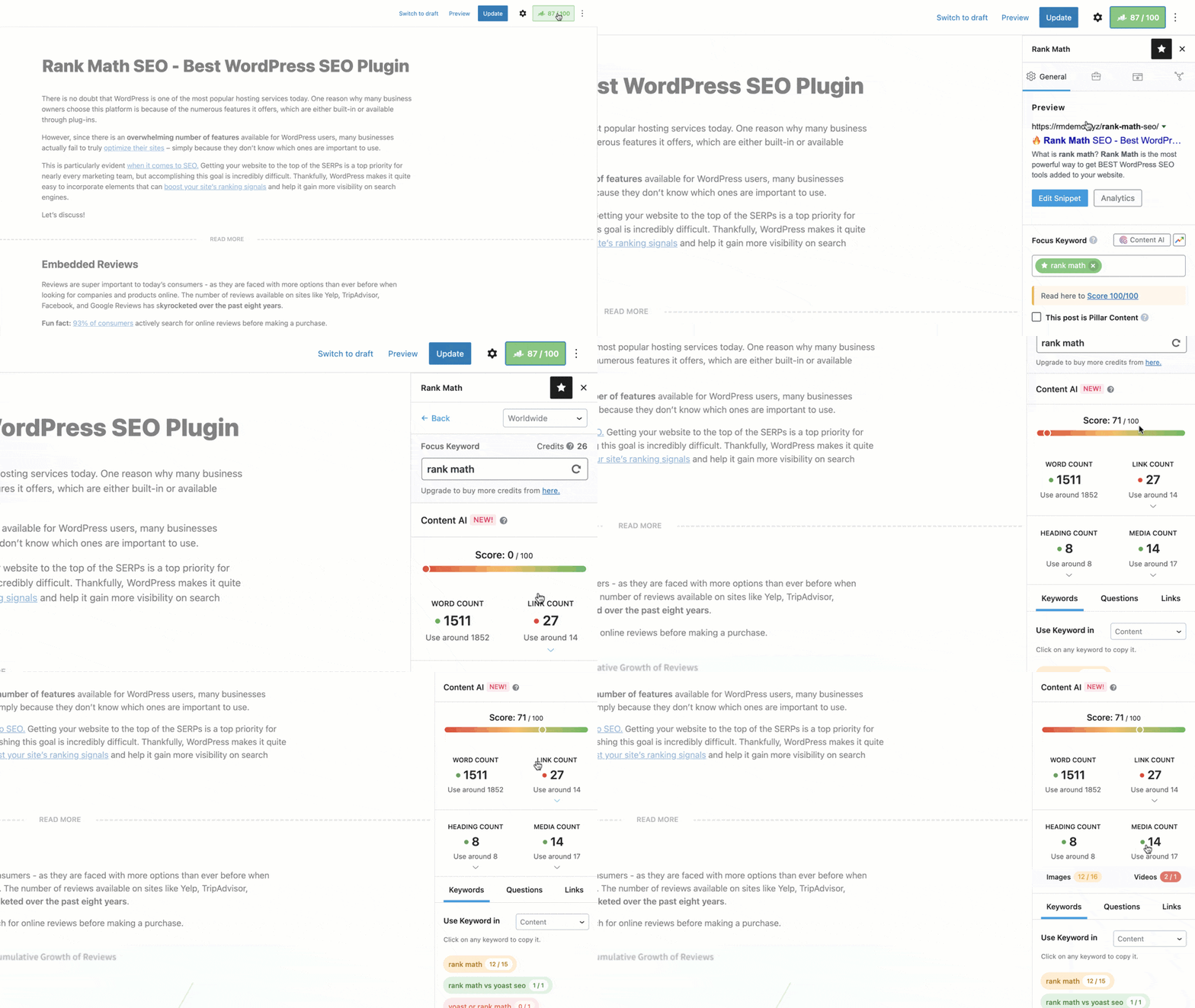
Content AI is Rank Math’s AI writing assistant. It lives inside the post editor and offers more than 40 tools: outlines, introductions, meta descriptions, FAQ sections, keyword research, and full article drafting, plus a RankBot assistant that answers SEO questions.
Here is the catch, and it is the most important thing to understand about Rank Math’s pricing: Content AI is not included in Rank Math PRO. It is a separate subscription called Rank Math AI, sold in three plans (Starter, Creator, Expert) with monthly credit allowances of 5,000, 12,000, and 30,000 credits. Credits are spent at roughly one credit per AI-generated word, 500 credits per keyword research request, and 50 credits per image alt text. Unused credits do not roll over.
What PRO includes is a 15-day trial of the Starter AI plan (Business gets the Creator trial, Agency gets the Expert trial). After 15 days, the AI tools stop unless you pay for the separate subscription, and Rank Math says the trial converts to the paid AI plan unless you cancel it first. The AI plans renew at $6.99, $11.99, and $18.99 per month billed annually, so PRO plus Content AI is two subscriptions, not one. I have not used Content AI myself, so this section is based on Rank Math’s documentation.
Analytics and Search Console integration
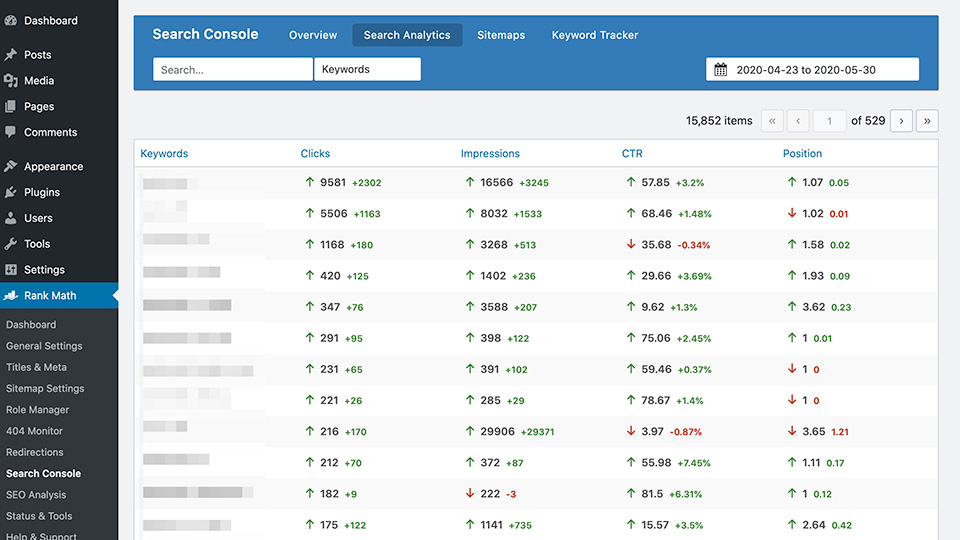
Rank Math can pull Google Search Console data into your WordPress dashboard, so you can see clicks, impressions, position history, and your top winning and losing keywords without leaving WordPress. PRO adds Google Analytics 4 integration, AdSense earning history, and a keyword rank tracker (500 keywords on PRO, 10,000 on Business, 50,000 on Agency).
Two honest caveats from other users’ reports: some find the ranking data inside Rank Math does not always match Search Console directly, and there is a known annoyance where Rank Math asks you to reconnect Search Console after logging out of WordPress. I check my Search Console numbers in Search Console itself.
Local SEO, WooCommerce SEO, and image SEO
The free version covers basic local SEO (business type, address, opening hours in schema). PRO adds multi-location support, which matters if you run more than one branch, plus advanced local SEO blocks for the editor.
WooCommerce SEO is PRO-only: product schema, product page optimization, and store specific settings. If you run a WooCommerce store, this is one of the stronger reasons to pay.
Image SEO in PRO adds automatic alt text handling and bulk find and replace for image attributes. The free version checks alt text in the content analysis, but the automation is paid.
Instant indexing
Rank Math connects to the Google Indexing API, Bing, and Yandex to request indexing for new or updated content. A new post can show up in search results faster than waiting for the next crawl. It is included in the free version.
What is new in 2026
Rank Math has shipped a lot in 2026, mostly around AI search:
- AI Visibility (added June 2026, expanded September 2026) tracks how your brand appears in AI answers from ChatGPT and Google Gemini, in more than 30 languages.
- AI Link Genius (launched March 2026) automates internal linking: it finds linking opportunities, fixes broken links, and detects orphan pages.
- Broken Link Checker automatically detects broken internal and external links.
- llms.txt support generates a clean llms.txt file so AI crawlers get a structured map of your site.
- MCP tools let AI assistants like Claude or ChatGPT read your SEO setup and help configure it.
Some of these need a Rank Math AI plan to use fully, and the free plugin includes the framework rather than the full tracking. Still, the direction is clear: Rank Math is building for a search world where AI answers sit next to traditional rankings.
A note on the October 2026 PRO security incident
Honesty requires mentioning this. In October 2026, Rank Math PRO version 3.0.123 packages downloaded during an 11-hour window (October 15, 20:02 UTC to October 16, 07:12 UTC) contained malware that planted a hidden backdoor on sites that activated them. Rank Math pulled the affected files the same day and released a clean version, 3.0.124. The free plugin from WordPress.org was not affected, which includes both of my sites.
It was a supply-chain attack on the vendor’s distribution, not a flaw in the plugin’s code, and the window was short. Still, it is a real black mark, and a reminder to keep backups and to update only from official sources. If you bought PRO around that date, check Rank Math’s security notice to confirm your copy was clean.
Rank Math pricing in 2026
All paid plans are billed annually, and prices exclude tax. The first-year price is discounted; renewals cost more. Budget for the renewal price, not the introductory price.
| Plan | First year | Renews at | Sites | Tracked keywords |
|---|---|---|---|---|
| Free | $0 | $0 | Unlimited personal sites | None |
| PRO | $95.88/yr ($7.99/mo) | $107.88/yr ($8.99/mo) | Unlimited personal sites | 500 |
| Business | $299.88/yr ($24.99/mo) | $335.88/yr ($27.99/mo) | 100 client sites | 10,000 |
| Agency | $659.88/yr ($54.99/mo) | $779.88/yr ($64.99/mo) | 500 client sites | 50,000 |
A few things to know about this table:
- PRO is for your own sites only. Client websites are excluded from the PRO license. If you work on client sites, you need Business or Agency.
- The limits on the pricing page are currently doubled as part of an offer (PRO shows 1,000 keywords, Business shows 200 sites and 20,000 keywords, Agency shows 750 sites and 75,000 keywords). The table above shows the standard limits.
- Every paid plan includes a 30-day money-back guarantee on new purchases.
- Content AI is extra. The AI plans are a separate subscription: Starter, Creator, and Expert renew at $6.99, $11.99, and $18.99 per month billed annually.
Black Friday note (checked Nov 24, 2026): Rank Math is currently running its Black Friday sale with up to 40% off first-year plans. Multiple deal trackers list PRO from $5.59 per month ($67.08 billed annually) during the sale, with most listing December 2, 2026 as the end date. Sale prices and end dates change, so check the live pricing page before you buy. You can see how this deal compares with the other Black Friday offers I am tracking in my Black Friday deals roundup.
Rank Math vs Yoast SEO
Yoast is the other big name in WordPress SEO, and it is the comparison most people ask about. Here is how they line up:
| Rank Math Free | Yoast SEO Free | Rank Math PRO | Yoast SEO Premium | |
|---|---|---|---|---|
| Price | $0 | $0 | $95.88 first year, renews $107.88/yr | $118.80/yr |
| Sites covered | Unlimited | 1 site per install | Unlimited personal sites | 1 site |
| Focus keywords per post | Up to 5 | 1 | Unlimited | Up to 5 |
| Redirections manager | Yes | No | Yes | Yes |
| 404 monitor | Yes | No | Yes | No |
| Schema generator | Yes (18 types) | Basic | Yes (840+ types) | Basic |
| Content AI | Small free allowance | No | 15-day trial (separate plan after) | AI tools included |
| Rank tracking | No | No | Yes (500 keywords) | No |
| WooCommerce SEO | No | No | Yes | Separate plugin ($178.80/yr) |
| Support | Forum | Forum | 24/7 | 24/7 |
The headline difference is value. Rank Math’s free version includes things Yoast charges for: multiple focus keywords, a redirection manager, and a 404 monitor. And Rank Math PRO at $107.88 a year at renewal covers unlimited personal sites, while Yoast Premium at $118.80 a year covers one site.
Yoast has its strengths. It is the older plugin, it has more than 10 million installs, and its interface is simpler. Its Premium plan includes AI drafting tools without a second subscription, and it bundles Local, Video, and News SEO into the one price. If you want the simplest possible setup and you only run one site, Yoast is a reasonable choice.
Pros and cons
What I like:
- The free version is genuinely useful, not a demo. Multiple focus keywords, redirections, 404 monitor, schema, and sitemaps all included.
- The content analysis box is clear and actionable, with a score out of 100 and specific checks you can fix one by one.
- PRO covers unlimited personal sites for one price, which is rare.
- The setup wizard and one-click import from Yoast make switching painless.
- Rank Math is moving fast on AI search (AI Visibility, llms.txt, MCP tools).
- The 30-day money-back guarantee takes the risk out of trying PRO.
What could be better:
- FAQ schema and custom schema in the post editor are PRO-only, which means free users add FAQ schema by hand.
- Content AI is a separate subscription, and the 15-day trial that comes with PRO converts to a paid plan unless you cancel it.
- The settings area is large. Advanced mode has a lot of options, and a beginner can feel overwhelmed.
- Renewal prices are higher than first-year prices, and the pricing page shows monthly figures for an annual bill, which is easy to misread.
- Some users report the in-dashboard analytics do not always match Search Console exactly, and the Search Console connection sometimes needs reconnecting.
- In October 2026, PRO downloads were compromised in a supply-chain attack during an 11-hour window. The free plugin was unaffected and the clean version 3.0.124 followed the same day, but it is a real black mark.
- PRO cannot be used on client sites, so freelancers have to jump straight to Business.
Verdict: is Rank Math worth it?
Yes. Rank Math is the SEO plugin I use every day, and the free version alone is the best free SEO plugin for WordPress I have used. It handles the fundamentals properly, it tells you what to fix in plain language, and it does not hold basic features hostage behind a paywall.
Start with the free version. If you find yourself wanting rank tracking, advanced schema, or WooCommerce SEO, PRO is fairly priced for unlimited personal sites, and the 30-day guarantee means you can try it without risk. If you work on client sites, go straight to Business.
The one thing I would change is the Content AI pricing. Selling the AI tools as a second subscription on top of PRO is confusing, and the trial converts to a paid plan unless you cancel it. Even with that complaint, the plugin itself is the strongest value in WordPress SEO right now.
If you want to put the basics from this review into practice, my SEO guide for affiliate marketers walks through keyword research, on-page optimization, and link building with Rank Math.
Start Your Online Business
If you’re done guessing and want experienced marketers guiding you every week, here’s the community I recommend:
Disclosure: This is my affiliate link. I may earn a commission if you join, at no extra cost to you.
Frequently asked questions
Is Rank Math really free?
Yes. The free version of Rank Math is free forever, with no time limit and no credit card required. It includes on-page SEO analysis with up to 5 focus keywords per post, XML sitemaps, schema markup, a redirections manager, a 404 monitor, and instant indexing.
Is Rank Math better than Yoast SEO?
For most users, yes, mainly on value. Rank Math’s free version includes multiple focus keywords, a redirection manager, and a 404 monitor, all of which Yoast charges for in Premium. Rank Math PRO also covers unlimited personal sites for $107.88 a year at renewal, while Yoast Premium costs $118.80 a year for one site.
Does Rank Math PRO include Content AI?
No. Content AI is a separate subscription called Rank Math AI, with its own Starter, Creator, and Expert plans. Rank Math PRO includes only a 15-day trial of the Starter AI plan. After the trial, the AI tools stop unless you pay for the AI subscription, and Rank Math says the trial converts to the paid plan unless you cancel it first. Budget for both subscriptions if you want the AI features.
Can I use Rank Math PRO on client websites?
No. The PRO license covers unlimited personal websites that you own, and client websites are excluded. If you manage SEO for clients, you need the Business plan (100 client sites) or the Agency plan (500 client sites).
Is Rank Math good for beginners?
Yes, with one warning. The setup wizard is excellent and walks you through everything in about 20 minutes, and the content analysis box tells you exactly what to fix on each post. But the full settings area in Advanced mode is large, and a beginner can feel overwhelmed by the number of options.

Leave a Reply
You must be logged in to post a comment.